
Frequently Asked Questions
Search for answers to common questions
Results for "番号": 25
-
① The number is printed on the back of the box that contained your smartphone.
② Open the phone dialer and enter “*#06#” to display your EID and IMEI numbers.
③ You can also check your EID and IMEI numbers in your smartphone’s Settings.
▼ For Android devices
Go to “Settings” → “More” or “Wireless & Networks” → “SIM information settings,” then check the information from the menu.
▼ For iOS devices (iPhone)
Go to “Settings” → “General” → “About” to check the information.
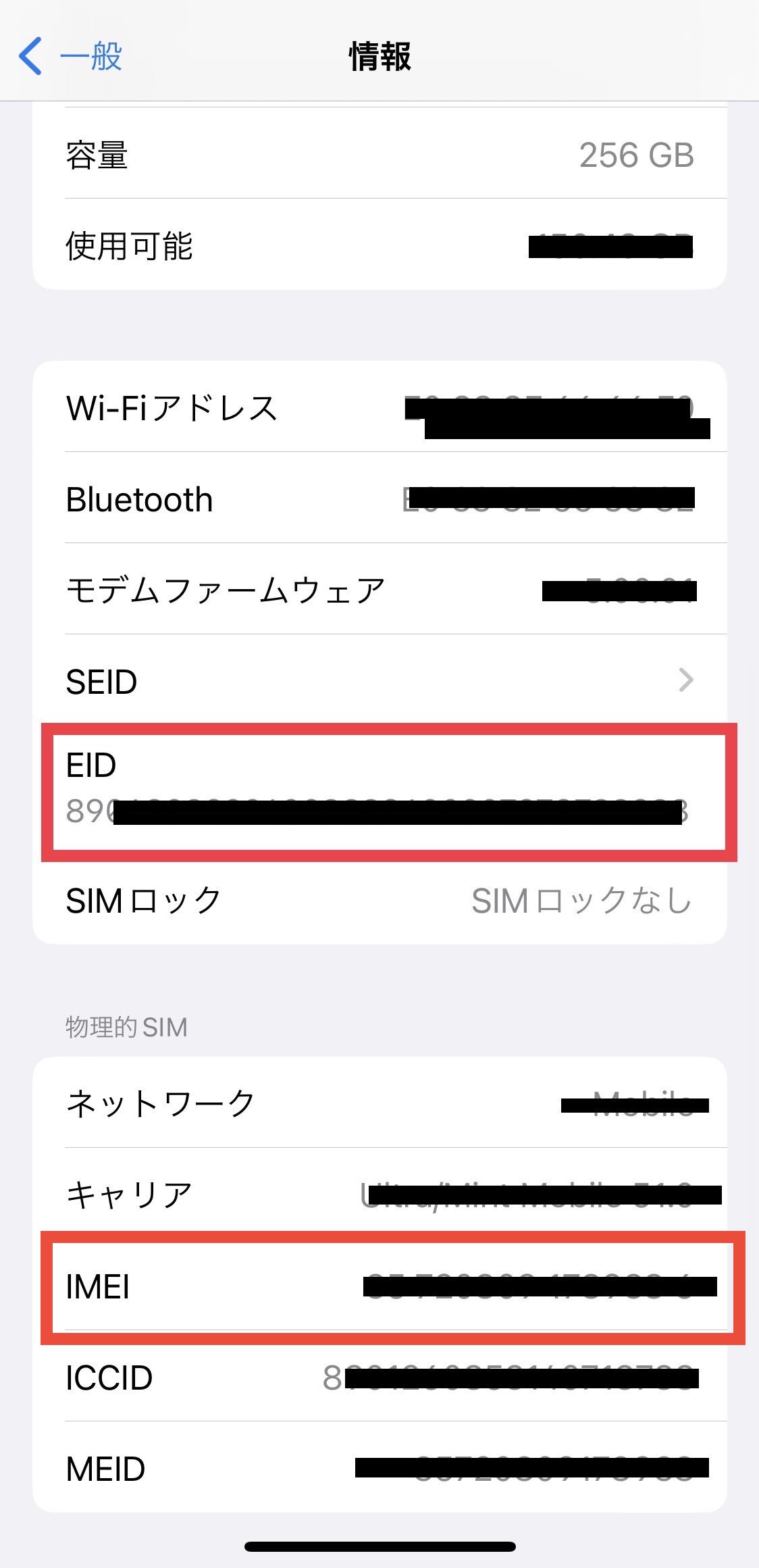
※If your EID is not displayed, your device does not support eSIM (digital SIM).
View detail 1 0 - Pocket WiFi ご利用案内
ポケットWiFi レンタル期間変更・延長・キャンセル・返却について
UNIVERSAL Mobile Customer Support
Please contact to UNIVERSAL Mobile Customer Support during our business hours.
Email : customer@universalmobile.us
Hours: 9:00 a.m. to 5:00 p.m. (Monday - Friday) *Closed on Saturday, Sunday, and holidays (U.S. West Coast time)
お問い合わせ・レンタル期間変更について
ポケットWi-Fiのレンタル期間変更、延長、キャンセルは、下記受付時間内にカスタマーサポートまでご連絡ください。
お問い合わせ先:UNIVERSAL Mobile カスタマーサポート
Eメール:customer@universalmobile.us
受付時間:午前9時~午後5時(月~金)※土・日・祝日はクローズ(米国西海岸時間)
■ To Change
To change your Rental Date, Please contact Customer Support before the Start Date with the following information.
*Reservation Number
*Reservation Name
*Email address
*New Rental Date■ 期間変更
レンタル期間変更は、ご利用開始日までにカスタマーサポートまでご連絡ください。
・予約番号
・お名前
・Eメールアドレス
・変更希望の日程■ To Extension
To extend your Rental Date, Please contact Customer Support before your Rental Period during our business hours with the following information.
*Reservation Number
*Reservation Name
*Email address
*Extension Date■ 延長
レンタル期間の延長は、ご利用終了日までにカスタマーサポートの営業時間内にご連絡ください。
・予約番号
・お名前
・Eメールアドレス
・延長期間■ To Cancel
To Cancel your order, Please contact Customer Support before the Start Date with the following information.
*Reservation Number
*Reservation Name
*Email addressIf you cancel your order after the start date, we will charge the fee based on the number of days passed.
If you cancel your order after we shipped the wifi , we won't refund the shipping fee.
■ キャンセル
キャンセルをご希望の場合はカスタマーサポートまでご連絡ください。
キャンセル料金はかかりませんが、ご連絡をいただいたタイミングによりご返金額が異なります。
●ポケットWiFi発送前のキャンセル(郵送の場合) 全額ご返金いたします ●ポケットWiFi発送(受取)後、利用開始日前のキャンセル(郵送の場合) 送料を除く金額を返金いたします ●ポケットWiFi発送(受取)、利用開始日後のキャンセル(郵送の場合) 送料、利用開始日を経過した日数分のレンタル費用を除く金額を返金いたします ※料金はご利用台数ごとに発生します
■ Late Fee
Return Due Date is the next business day of the Returning Date.
Please send / drop of the Pocket WiFi within the next business day of the Returning Date.
We will charge you the following late fee until we receive the wifi after the due date.
- Late Fee: $12 per day ( plus Rental Insurance Fee)
If the rental cost exceeds $12, the original rental price will be charged for the days overdue.
■ 延滞料金
返却期限:
- ご帰国日の翌営業日までに発送手続きをしてください
- 持込で返却される場合はご帰国日の翌営業日までにReturn Boxへ返却してください
ご返却の確認ができない場合、延滞料金として[1日あたり一律$12、( + 安心補償パック)× 超過日数分]が請求されます。
※レンタル費用が$12を超えるプラン場合は、レンタル費用× 超過日数分をご請求させていただきます。
View detail 0 0 -
Yes, eSIM is supported.
〈For New Customers〉
When ordering a U.S. SIM plan, please select [eSIM (built-in SIM)].
〈For Existing Customers〉
If you are currently using UNIVERSAL Mobile and would like to switch from a physical SIM card to eSIM,
please contact Customer Support with your EID number (32-digit eSIM identification number) and IMEI number (15-digit number).
For information about changing your plan:
======================
Contact Information:
UNIVERSAL Mobile Customer Support
Email: customer@universalmobile.us
======================
How to Check Your EID and IMEI Numbers
① Check the EID label on the side of the box that your smartphone came in.
② Check your EID and IMEI numbers in your smartphone settings.
For Android devices
Settings → Other or Wireless & Networks → SIM Information Settings → EID Display / IMEI Display.
For iOS devices
Settings → General → About.
Alternatively, open the Phone app and dial “*#06#”. Your EID and IMEI numbers will be displayed.
View detail 0 0 - SIM / eSIM Optional Services Last updated: September 23, 2021
What is Japan Call?
? Japan Call ① ― 050 Number (Incoming Call Option)An optional service that gives you a Japanese phone number starting with 050 in addition to your US number. People in Japan can call you in the US at domestic Japanese call rates — making it easy and affordable for family and friends back home to reach you.
✅ Key Features
- Get a Japanese phone number beginning with 050
- People in Japan can call you at domestic Japanese rates
- No charge for receiving calls within the US
⚠️ Important Notes
- The 050 number is for incoming calls only. You cannot make calls or send/receive SMS from it.
- Cannot be used as a registration number for apps that require SMS verification (e.g., LINE).
- Incoming calls may display as 【Unknown Caller】 or 【Scam Likely】. If you have call-blocking enabled for such labels, please disable it to receive calls.
- As an IP phone number, it may not be accepted as an official contact number on formal documents.
- Members on the $15/month minimum plan will be charged an additional $0.25/min when using the 050 number.
? Japan Call ② ― Unlimited Calls to Japan (USD $10/month)An optional plan that lets you make unlimited calls to Japanese landlines and mobile phones from within the US for just $10/month. The recipient in Japan is not charged for incoming calls.
✅ Key Features
- Unlimited calls to Japanese landlines and mobile numbers from the US
- No charge to the recipient in Japan
- Only $10/month
? How to Make a Japan Call
- Dial the Access Number (see note ※1)
- Follow the voice guidance and enter Country code 81 + recipient's phone number (see note ※2)
※1 The access number will be provided after signing up. You can also find it on My Page under 【Usage Status】.
※2 If the recipient's number begins with 0, omit the leading 0. (Example: 090-xxxx-xxxx → dial 81-90-xxxx-xxxx)
⚠️ Important Notes
- Calls to Japanese toll-free numbers (0120) are not supported.
- Members on the $15/month minimum plan will be charged an additional $0.25/min even with this option active.
? To Sign Up or for Inquiries
Please contact our customer support team at: customer@universalmobile.us
View detail 0 0 -
To change your monthly SIM plan or optional plan, please contact Customer Support and provide the following information:
● Account holder's name
● Phone number
● Requested plan change
● Effective date (immediately or starting on the 11th)
======================
Contact:
UNIVERSAL Mobile Customer Support
Email: customer@universalmobile.us
======================
Note 1) UNIVERSAL Mobile's billing cycle closes on the 10th of each month. Monthly base charges for the period from the 11th through the 10th of the following month are billed in advance.
The new plan will take effect on the 11th.
Example:
・Request date: August 5
・Plan change effective date: August 11
・Plan change: From the $45/month Business Plan to the $60/month Premier Plan
・Additional charge: None
Note 2) For same-day monthly SIM plan changes or additions of optional plans, the following charges will be added to your next bill.
■ Monthly plan change: The prorated cost of the new SIM plan from the effective date through the billing cycle closing date (the 10th)
Example:
・Request date: August 5
・Plan change effective date: August 5
・Plan change: From the $45/month Business Plan to the $60/month Premier Plan
・Additional charge: $12.00 (6 days × prorated daily rate of $2 for the $60/month Premier Plan)
■ Optional plans: The full monthly cost of the optional plan will be charged.
Example:
・Request date: August 5
・Plan change effective date: August 5
・Plan change: Add Japan Calling
・Additional charge: $15.00 (Optional plans are not prorated, so the full monthly fee will be charged.)
Note 3) Monthly SIM plan change fee: $20.00
Note 4) Customers currently using a legacy SIM plan, legacy rate, or special rate cannot return to their previous plan or rate once they change plans.
Note 5) Customers currently using an optional plan at a legacy rate cannot re-enroll at the same legacy rate after canceling the optional plan.
Note 6) If you wish to change your plan again, you must wait until at least 30 days have passed since your previous plan change.
Note 7) The $60/month Premier Plan requires a dedicated SIM card or eSIM. When changing to or from this plan, you will need to replace your physical SIM card or switch your eSIM.
Note 8) If you wish to switch to the $60 Premier Plan, or from the $60 Premier Plan to the $45, $35, or $15 plans, the plan change cannot be processed while you are outside the United States.
※
View detail 0 0 -
If your mobile phone is lost or stolen, you will need to suspend your SIM card and request a replacement.
Please contact Customer Support with the following information:
• Account Holder Name
• Lost or Stolen Phone Number
• Shipping Address for Replacement SIM Card
======================
Contact Us:
UNIVERSAL Mobile Customer Support
Email: customer@universalmobile.us
======================
*Please note that once a SIM card is suspended, it becomes permanently deactivated and cannot be reused even if found.
*SIM replacement fee: $20
View detail 0 0 -
There are several possible reasons for this issue, including the following:
● Unstable network coverage or network routing delays may cause verification codes to arrive late.
● If you have enabled call or SMS blocking for unknown numbers, verification codes may be blocked.
● If your Apple ID or Google Play Store account region is set to another country (e.g., Japan), you may not receive verification codes sent from U.S. websites. Please update your account region to match the country you are currently using the service in.
Due to the variety of potential causes, it is difficult to determine the exact issue. If you still cannot receive verification codes after checking the above, please contact the service sender (the service requiring 2-factor authentication) to inquire about their verification policies and requirements.
View detail 0 0 -
We offer SIM card shipping to addresses in both the U.S. and Japan.
• For deliveries within the U.S., your SIM card will arrive in 2 to 5 business days after placing your order.
Once shipped, we will provide you with a USPS tracking number.
*Shipped from Torrance, California.
• For deliveries within Japan, your SIM card will arrive in 2 to 5 business days after placing your order.
Once shipped, we will provide you with a Japan Post tracking number.
Please submit your application at least 1 week prior to your departure for the U.S.
*Shipped from Tokyo, Japan.
If you need to receive your SIM card urgently, please contact Customer Support.
*Delivery to hotels, workplaces, or schools is also available.
If you wish to have your SIM card shipped to an address other than your home, please confirm with the location in advance whether they can accept deliveries on your behalf.
View detail 0 0 -
We send an notification email when payment cannot be processed from your registered credit card due to reasons such as a change in card number, expiration, or insufficient funds.
If you need to update your payment card information, please log in to My Page at the top right of the UNIVERSAL Mobile website and update your details under "Payment Method".
Additionally, if you receive a payment notification email even though your card details and balance are normal, please re-register your card information to update the system.
Log in to My Page
https://universalmobile.us/mypage/login?language=en
 View detail 0 0
 -
◆◆ If you are using an eSIM, you will need to submit your new device details to proceed with the transfer process. ◆◆
Please submit your new device's EID number and IMEI number via our Contact Form.
Please refer to this guide for instructions on how to check your EID number and IMEI number.
◆◆ If you are using a physical SIM card, you do not need to contact Customer Support when changing devices. ◆◆
Simply remove the SIM card from your current device, insert it into your new device, and proceed with the device setup.
There is no need to repurchase or reactivate your SIM card, so you can start using it immediately after setting up your device.
■ Transferring Data from iPhone to iPhone
https://support.apple.com/ja-jp/HT210216
■ Transferring Data from Android to iPhone
https://support.apple.com/ja-jp/HT201196
■ Transferring Data to Android (from Android or other smartphones)
■ Transferring LINE Account Data
https://guide.line.me/ja/migration/
active
View detail 0 0 -
When you update your registered credit card information with us, a temporary authorization charge of $1 will be placed on your card to verify its validity and ensure the card details are correct.
Please note that this is only a temporary authorization hold, not an actual charge.
If you check your credit card statement later and find an actual $1 charge from UNIVERSAL Mobile, please contact Customer Support using the information below.
UNIVERSAL Mobile Customer Support
Email: customer@universalmobile.us
Tel: 888-504-9056
Hours: 10:00AM - 5:00PM (Mon - Fri) Sat/Sun Closed (PST)
View detail 0 0 -
To cancel your service, please contact Customer Support and provide the following information.
Cancellation requests are accepted only by email or through the Customer Support Portal (ticket system).
Please note: Cancellation requests cannot be made by phone.
Please provide:
Name of the account holder
Phone number registered to the account
Cancellation date
Reason for cancellation
There are no cancellation fees or early termination penalties.
======================
Contact Information:
UNIVERSAL Mobile Customer Support
Email: customer@universalmobile.us
======================
Note 1)
The billing cycle closes on the 10th of each month. If you contact us to cancel after the 10th, you will be charged the monthly fee for that billing cycle.
Please note that there are no prorated refunds.
Note 2)
If you cancel before completing one full month of service (i.e., within 10 days before the billing cutoff date), the full monthly fee will still be charged.
Note 3)
For the Mini Plan, call charges, and for the Premium Plan, international calling and international roaming charges may be billed in the following or second month after usage. Therefore, any charges incurred may still be billed after the cancellation process has been completed.
Note 4)
If you purchased a mobile device through an installment payment plan, you must pay the remaining balance of the device in full before the service can be canceled.
Note 5)
You do not need to return the SIM card. Please dispose of it yourself.
Note 6)
If you transfer your service to another provider, you must still contact us to complete the cancellation procedure after the transfer has been completed.
Your service will not be automatically canceled. If you do not contact us, billing will continue.
Transfer your phone number to another provider:
https://shorturl.at/fgmHQ
Note 7)
Once the cancellation procedure is completed, your phone number will be lost and cannot be used again after cancellation.
If you are transferring your phone number to another provider, you must complete the transfer before requesting cancellation.
View detail 0 0 - SIM / eSIM Number Transfer Last updated: January 11, 2022
About Number Portability (MNP)
Your US phone number can be transferred to UNIVERSAL Mobile through number portability (MNP), so you can keep using the same number.
? Information Required for Transfer
- Your current carrier name
- Account number
- Password or PIN number (Transfer PIN)
⚠️ Transfer is not possible if the phone line is inactive or if the number is a non-US phone number.
【Transfer Process】
↓②Request SIM Activation
During activation, enter your account number and PIN in the required fields.↓③Number transfer on your requested start date
UNIVERSAL Mobile will process the number transfer on your desired activation date.
You will receive a 「SIM Activation Complete」 email when the process is done.↓④Insert the UNIVERSAL Mobile SIM and restart your device
After the transfer is fully complete, cancel your previous carrier contract.⚠️ Important Notes
- Transfer will fail if your current contract is cancelled, deactivated, or if a prepaid plan has expired before the transfer is complete.
- Due to incorrect information or delays from the previous carrier, the transfer may not complete on the expected date. Please allow extra time when requesting number transfer.
- Japanese phone numbers cannot be transferred through this process.
- Prepaid contract holders may experience longer transfer times. In rare cases, a transfer may be denied and a new number will be assigned instead.
- If you are using a device purchased from another carrier, please confirm that the SIM lock has been removed before proceeding.
? Contact Us
For questions, please contact us at customer@universalmobile.us.
View detail 0 0 -
• For iPhone Users
Setting Up Visual Voicemail on iPhone
1. Open the Phone app and tap "Voicemail".
2. Enter your default password. The default password is the last four digits of your phone number.
3. Create a new password to complete the setup.
• For Android Users
1. Press and hold "1", or dial "123" to connect to Voicemail.
2. If prompted for a password, enter the last four digits of your phone number as the default password.
3. Create a new password to complete the setup.
• Voicemail Main Menu
1 - Listen to messages
2 - Send a message
3 - Create a greeting
4 - Mailbox options
5 - Password security
0 - Help
• How to Reset Your Password
1. Open the keypad in the Phone app, enter "#793#", and press the Call button.
2. Once the message “Your Voicemail Password has been reset to the last 4 digits of your mobile number.” appears on your screen, the reset is complete.
View detail 0 0 -
A. Yes. Please tell the following information to our customer support to change your monthly SIM plan and optional plan.
●User name
●Phone number
●Details of changes for plans
●Applicable date of changes (Immediately or from 11th)
======================
Contact Information:
UNIVERSAL Mobile Customer Support
Email: customer@universalmobile.us
======================
***Notes***
*1) Monthly billing cycle of UNIVERSAL Mobile closes on the 10th of every month, and monthly basic rate (10th of the next month from 11th) is prepaid.
Normally, new plans will be applied from the 11th after the monthly billing is closed on the 10th.
<e.g.>
・Requested date of changes: August 5
・Applicable date of changes: August 11
・Details of changes: Change to the premium plan ($60 per month) to the business plan ($45 per month).
・Additional fees: None
*2) If you change your plan or add an optional plan immediately, we will charge the below fees to your invoice for the next month.
■The monthly plan is changed: You will be charged SIM plan's fee prorated from the applied date of changes to the closing date of 10th.
<e.g.>
・Requested date of changes: August 5
・Applicable date of changes: August 5
・Details of changes: Changing to the premium plan for $60 per month to the business plan for $45 per month.
・Additional fees: $12 (6days*$2 =$12)
■The optional plan is added: You will be charged monthly optional plan's fee.
<e.g.>
・Requested date of changes: August 5
・Applicable date of changes: August 5
・Details of changes: Adding the Japan call plan
・Additional fees: $10
*3) Changing fee for Monthly SIM plans is $20
*4) Members who are applying for the old SIM plan cannot return to the original old plan once the SIM plan is changed.
*5) Members who apply for the optional plan at the old rate cannot re-enroll at the original rate after canceling the optional plan.
*6) Premium plan ($60 per month) is required using the SIM card made for it. So, you will need to exchange your current SIM card to the SIM card made for Premium plan only. In addition, you will need to exchange the SIM card when you change to Minimum/Light/Business plan from Premium plan as well. ※We will deliver a replacement SIM card in about 3 to 6 business days after receiving the request for the change of plans.
■Changing plans with replacement the SIM card
Case ① Current plan→Minimum plan ($15 per month) or Light plan ($30 per month) or Business plan ($45 per month)
New plan→Premium plan ($60 per month)
Case ② Current plan→Premium plan ($60 per month)
New plan→Minimum plan ($15 per month) or Light plan ($30 per month) or Business plan ($45 per month)
■Changing plans without replacement the SIM card
Case ① Current plan→Minimum plan ($15 per month)
New plan→or Light plan ($30 per month) or Business plan ($45 per month)
Case ② Current plan→Light plan ($30 per month)
New plan→ Minimum plan ($15 per month) or Business plan ($45 per month)
Case ③ Current plan→Business plan ($45 per month)
New plan→ Minimum plan ($15 per month) or Light plan ($30 per month)
View detail 0 0 -
International SMS to numbers outside the U.S. is included at no extra charge with unlimited usage.
*Available on all SIM plans.
View detail 0 0 -
This optional service provides you with a Japanese phone number starting with 050 in addition to your U.S. mobile phone number.
• Japanese phone numbers starting with 050 are for incoming calls only.
• Callers from Japan can reach subscribers staying in the U.S. at Japanese domestic call rates, making it a convenient feature for those calling you from Japan.
• Incoming calls received within the U.S. are free of charge.
(Note) Subscribers to the $15/Month Minimum Plan will be charged a calling rate of $0.25/minute even when receiving calls on a 050 number.
*Making outgoing calls or sending/receiving text messages (SMS) using the 050 number is not supported.
Additionally, this number cannot be used to register for apps that require SMS verification codes, such as LINE.
*Because the 050 number functions as a call-forwarding number, incoming caller ID display may vary depending on the caller's device and Japanese carrier, sometimes appearing as "Unknown Caller" or "Scam Likely". If you have call-blocking settings enabled for "Scam Likely" or unknown numbers, you may not receive incoming calls on your 050 number. Please disable call blocking to ensure calls go through.
*Please note that while internal testing confirms the functionality of 050 numbers, connection issues may occasionally occur due to local signal conditions or other external factors.
*050 numbers are VoIP numbers, and it is not uncommon for them to be unaccepted as official contact numbers for certain documents or services. Please keep this in mind when subscribing.
To add this optional plan, please contact Customer Support.======================
Contact Information:
UNIVERSAL Mobile Customer Support
Email: customer@universalmobile.us
======================
View detail 0 0 -
• Other Charges, Taxes & Surcharges
These are standard fees required to maintain your phone line. They apply to all active phone numbers and include taxes, regulatory surcharges, State 911 fees, the Teleconnect Fund, and other mandated government fees.
*Please note that these amounts may vary slightly each month based on updated tax rates and government fees.
• Usage Charges (LOCAL AIRTIME, LONG DISTANCE, and INTERNATIONAL CHARGES)
These include calling fees for both domestic and international calls.
*For $15/Month Minimum Plan subscribers, domestic calling charges will be billed on the invoice following the month of use.
*International calling fees will be billed one to two months after the month of use.
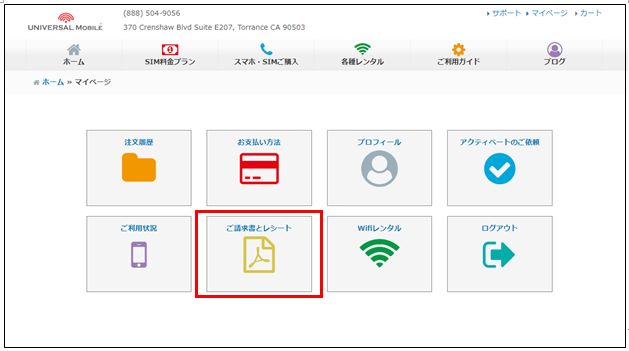
You can check your billing statements under "Invoices and Receipts" on "My Page".
https://universalmobile.us/mypage/login?redirecturl=/mypage
 View detail 0 0
 -
*Please note that temporary service suspensions are not available.*
If you wish to stop your service, you will need to process a contract cancellation.
Please note that once your contract is canceled, your current phone number will be lost.
If you sign up again in the future, a new phone number will be issued.
View detail 0 0 -
To request your account number and PIN, please contact UNIVERSAL Mobile Customer Support.
Information required when contacting us:
• Account Holder Name
• Phone Number
======================
Contact Information:
UNIVERSAL Mobile Customer Support
Email: customer@universalmobile.us
======================
*Transfer your phone number to another provider
View detail 0 0 -
In the United States, it is very common to receive spam calls, wrong numbers, and wrong text messages shortly after getting a new phone number.
One reason for this is a shortage of phone numbers in the U.S., which leads all carriers to recycle phone numbers after an account is canceled.
Canceled numbers are typically held for a short holding period (usually 3 months to 1 year, or as short as 1 month) before being reassigned to new users.
Additionally, telemarketers and robocallers use automated machines to call numbers at random, making it difficult to block spam calls completely.
〈Recommended Solutions〉
1. Use a Spam Call Blocker App
If you are using a smartphone, you can use mobile apps to block spam calls, wrong numbers, and spam text messages.
2. Avoid Answering Calls from Unknown Numbers
If you let unknown calls go unanswered and individually block those numbers afterwards, the frequency of spam calls, wrong numbers, and spam texts may decrease.
【How to Block Callers on iPhone】
Go to Recents ⇒ Tap the info icon (the "i" symbol) next to the number you want to block ⇒ Scroll down to the bottom and tap "Block this Caller" ⇒ Tap "Block Contact".

【Silence Unknown Callers】*Feature available on iPhone iOS 13 or later
Enabling the "Silence Unknown Callers" setting will automatically silence incoming calls from numbers not saved in your contacts and send them straight to voicemail.
Settings ⇒ Phone ⇒ Silence Unknown Callers ⇒ Toggle ON / Green

3. Change Your Phone Number
We can change your phone number upon request.
If you would like to request a number change, please contact UNIVERSAL Mobile Customer Support.
*Please note in advance that changing your phone number does not guarantee that the new number will be free of spam calls or text messages.
View detail 0 0 -
Contact the new provider you'd like to port your current phone number to, and they will let you know what details they'll need in order to port it.
*Customers with Premier Plan*
If you are with Premier Plan and plan to transfer your current number to T-mobile, the process will take longer than usual due to the transfer process between the same carriers.
Please be sure to start the procedure well in advance of the date.
Also, please note that in rare cases, T-mobile, which process the transfer procedure, may determine that transfer procedures between the same carriers are not possible.
View detail 0 0 -
apanese toll-free and Navi Dial numbers are only accessible within Japan. Unfortunately, they cannot be called from overseas phone numbers.
View detail 0 0 -
You can keep your U.S. phone number when switching to another carrier through number portability (number transfer).
Information Required for Number Transfer
When transferring your phone number to another carrier, you will need the following information:
• Account Number
• Transfer PIN
Need Your Account Number or Transfer PIN?
If you need your Account Number or Transfer PIN, please contact us through the form below.
Important Note
Please note that your phone number cannot be transferred if your current service is canceled or becomes inactive before the number transfer is completed, or if your prepaid service expires.
View detail 0 0 -
You can switch your current physical SIM to an eSIM.
You can continue using your current phone number.Steps
1 Send Us Your Device Information
We need the following information to switch your SIM to an eSIM.
Please send us the information by email.EID The unique identifier for your eSIM IMEI Your device's unique identification number Current Phone Number If you wish to keep your current number How to find your EID and IMEI:
How to Find Your EID and IMEI2 We Process Your eSIM Request
Once we receive your EID and IMEI, we will process the switch to an eSIM.
The process usually takes 1–2 business days.3 Install Your eSIM
Once the process is complete, we will send you an eSIM QR code or activation code by email.
Follow the instructions in your device settings to install the eSIM.Important Notes
- Once you switch to an eSIM, your current physical SIM will no longer work.
- Only eSIM-compatible devices can be switched to an eSIM. Please make sure your device supports eSIM.
- You can continue using your current physical SIM until the switch is complete.
- You can keep your current phone number after switching to an eSIM.
Contact Us
If you would like to request a SIM-to-eSIM switch or have any questions, please contact our customer support team.
UNIVERSAL Mobile Customer Support
support@universal-mobile.comView detail 0 0