
Frequently Asked Questions
Search for answers to common questions
Results for "テキスト": 4
-
Wi-Fi Calling is a feature that allows you to make phone calls and send SMS over a Wi-Fi network.
With Wi-Fi Calling, you can make/receive calls and send/receive text messages even in areas with weak coverage, outside service areas, or outside the U.S.
● No separate plan application required
● No extra charge for using the Wi-Fi Calling feature (Note 1)(Note 2)
(Note 1) For Premier Plan (T-Mobile), calling charges of $0.25/min apply for each call (outgoing/incoming).
(Note 1) For Premier Plan (Verizon), Wi-Fi Calling is not available.
(Note 2) For Minimum Plan, calling charges of $0.25/min apply for each call (outgoing/incoming).
==============================
■ Making / Receiving calls to/from U.S. phone numbers
・$60/mo Premier Plan ⇒ Yes (Note 1)
・$45/mo Business ⇒ Yes
・$30/mo Lite Plan ⇒ Yes
・$15/mo Minimum Plan ⇒ Yes (Note 2)
■ Sending / Receiving SMS to/from U.S. phone numbers
・$60/mo Premier Plan ⇒ Yes
・$45/mo Business ⇒ Yes
・$30/mo Lite Plan ⇒ Yes
・$15/mo Minimum Plan ⇒ Yes
【 When using the Wi-Fi Calling feature in Japan 】
■ Making calls to Japanese phone numbers (Japan Call)
・$60/mo Premier Plan ⇒ Yes (Note 1)
・$45/mo Business ⇒ Yes
・$30/mo Lite Plan ⇒ Yes
・$15/mo Minimum Plan ⇒ Yes (Note 2)
■ Receiving calls from Japanese phone numbers
・$60/mo Premier Plan ⇒ Yes (Note 1)
・$45/mo Business ⇒ Yes
・$30/mo Lite Plan ⇒ Yes
・$15/mo Minimum Plan ⇒ Yes (Note 2)
■ Sending / Receiving SMS to/from Japanese phone numbers
・$60/mo Premier Plan ⇒ Yes
・$45/mo Business ⇒ Yes
・$30/mo Lite Plan ⇒ Yes
・$15/mo Minimum Plan ⇒ Yes
==============================
< Smartphone Setup Instructions >
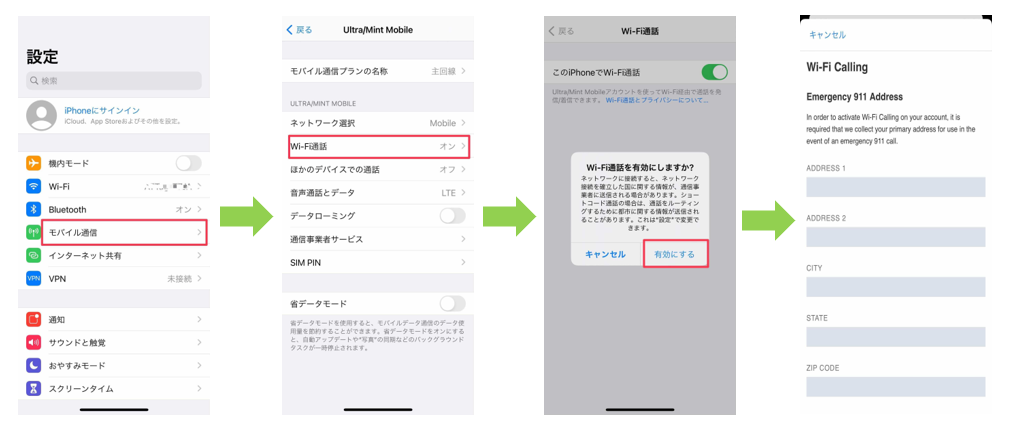
iPhone
Settings > Cellular > Wi-Fi Calling > On > Enable > Register Emergency 911 Address
*Please register a U.S. address for the Emergency 911 Address
*When using the Wi-Fi Calling feature, please set Data Roaming to OFF
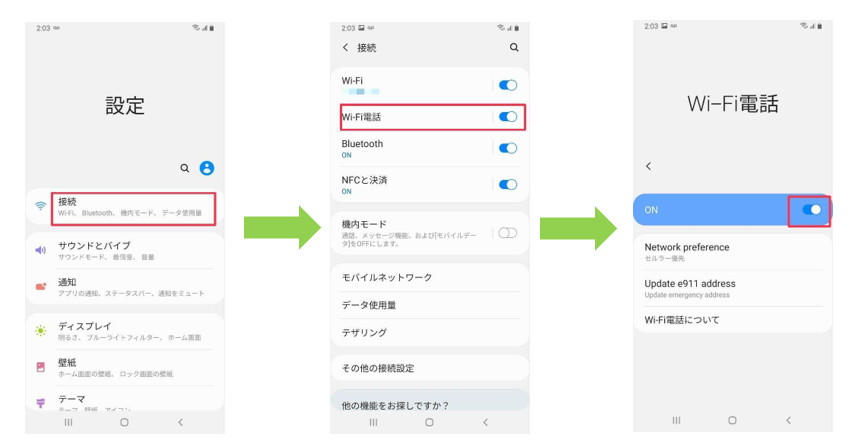
Android
Settings > Connections > Wi-Fi Calling > On > Register Emergency 911 Address
*Please register a U.S. address for the Emergency 911 Address
*Depending on the smartphone model, you may not be able to register this Emergency 911 Address. If you cannot use the Wi-Fi Calling feature due to registration issues, please contact UNIVERSAL Mobile Customer Support.
*Menu options may differ depending on your smartphone model.
*When using the Wi-Fi Calling feature, please set Data Roaming to OFF
==============================
About UNIVERSAL Mobile Pocket Wi-Fi Rental!
● Available in over 120 countries worldwide, including Japan, Canada, and Mexico.
● Affordable rental rates starting from $5/day.
■ Click here to check details on Pocket Wi-Fi rentals for over 120 countries worldwide.
=========================
Contact Us:
UNIVERSAL Mobile Customer Support
Email: customer@universalmobile.us
=========================
View detail 0 0 -
There are several possible reasons for this issue, including the following:
● Unstable network coverage or network routing delays may cause verification codes to arrive late.
● If you have enabled call or SMS blocking for unknown numbers, verification codes may be blocked.
● If your Apple ID or Google Play Store account region is set to another country (e.g., Japan), you may not receive verification codes sent from U.S. websites. Please update your account region to match the country you are currently using the service in.
Due to the variety of potential causes, it is difficult to determine the exact issue. If you still cannot receive verification codes after checking the above, please contact the service sender (the service requiring 2-factor authentication) to inquire about their verification policies and requirements.
View detail 0 0 -
Because UNIVERSAL Mobile uses the network of a T-Mobile-affiliated carrier,
you may occasionally receive SMS messages directly from the carrier.
These messages are often related to SIM card insertion or warnings about international calling, and no action is required on your part.
Please also be aware that you may occasionally receive scam messages impersonating the carrier. Do not click on any links in suspicious messages.
If you would like us to review the content of an SMS message you received, please contact UNIVERSAL Mobile Customer Support using the information below.
Contact Information:
UNIVERSAL Mobile Customer Support
Email: customer@universalmobile.us
Phone: 888-504-9056
View detail 0 0 -
In the United States, it is very common to receive spam calls, wrong numbers, and wrong text messages shortly after getting a new phone number.
One reason for this is a shortage of phone numbers in the U.S., which leads all carriers to recycle phone numbers after an account is canceled.
Canceled numbers are typically held for a short holding period (usually 3 months to 1 year, or as short as 1 month) before being reassigned to new users.
Additionally, telemarketers and robocallers use automated machines to call numbers at random, making it difficult to block spam calls completely.
〈Recommended Solutions〉
1. Use a Spam Call Blocker App
If you are using a smartphone, you can use mobile apps to block spam calls, wrong numbers, and spam text messages.
2. Avoid Answering Calls from Unknown Numbers
If you let unknown calls go unanswered and individually block those numbers afterwards, the frequency of spam calls, wrong numbers, and spam texts may decrease.
【How to Block Callers on iPhone】
Go to Recents ⇒ Tap the info icon (the "i" symbol) next to the number you want to block ⇒ Scroll down to the bottom and tap "Block this Caller" ⇒ Tap "Block Contact".

【Silence Unknown Callers】*Feature available on iPhone iOS 13 or later
Enabling the "Silence Unknown Callers" setting will automatically silence incoming calls from numbers not saved in your contacts and send them straight to voicemail.
Settings ⇒ Phone ⇒ Silence Unknown Callers ⇒ Toggle ON / Green

3. Change Your Phone Number
We can change your phone number upon request.
If you would like to request a number change, please contact UNIVERSAL Mobile Customer Support.
*Please note in advance that changing your phone number does not guarantee that the new number will be free of spam calls or text messages.
View detail 0 0